A step-by-step guide for users, relatives and care staff.
How Kalinio works
Kalinio reads letters, words and menu items aloud one after another and highlights them on the screen. This automatic progression through the choices is called auditory scanning. You do not need to point at the letter or menu item on the screen—your signal is enough to select it.
Subscription notice: New users can try Kalinio free for 14 days if they are eligible for the trial offer. After that, continued access to Kalinio requires a paid, automatically renewing monthly or annual subscription purchased in the app. The app cannot be used without an active subscription.
1
Listen
Kalinio reads the available items aloud one after another.
2
Select
When you hear the item you want, activate once using your chosen input method.
3
Communicate
Selected letters form words. Saved words and statements can be selected directly.
Kalinio supports communication. It is not a medical diagnostic, treatment or cure.
The app images show an iPad example, mostly with an English interface. You can choose the language in Kalinio. Visible control values are examples, not recommended settings.
Getting startedBefore first use
Set-up depends on the chosen input method. Position the device, microphone or camera, grant the required permissions and choose the input method. Tongue clicks and camera gestures must be calibrated: the user repeats the sound or gesture several times so Kalinio can learn it. Then calmly test whether single and double inputs are recognized reliably.
1
Select a language.
2
Activate the desired input method.
3
If necessary, calibrate the microphone or camera.
4
Start communicating.
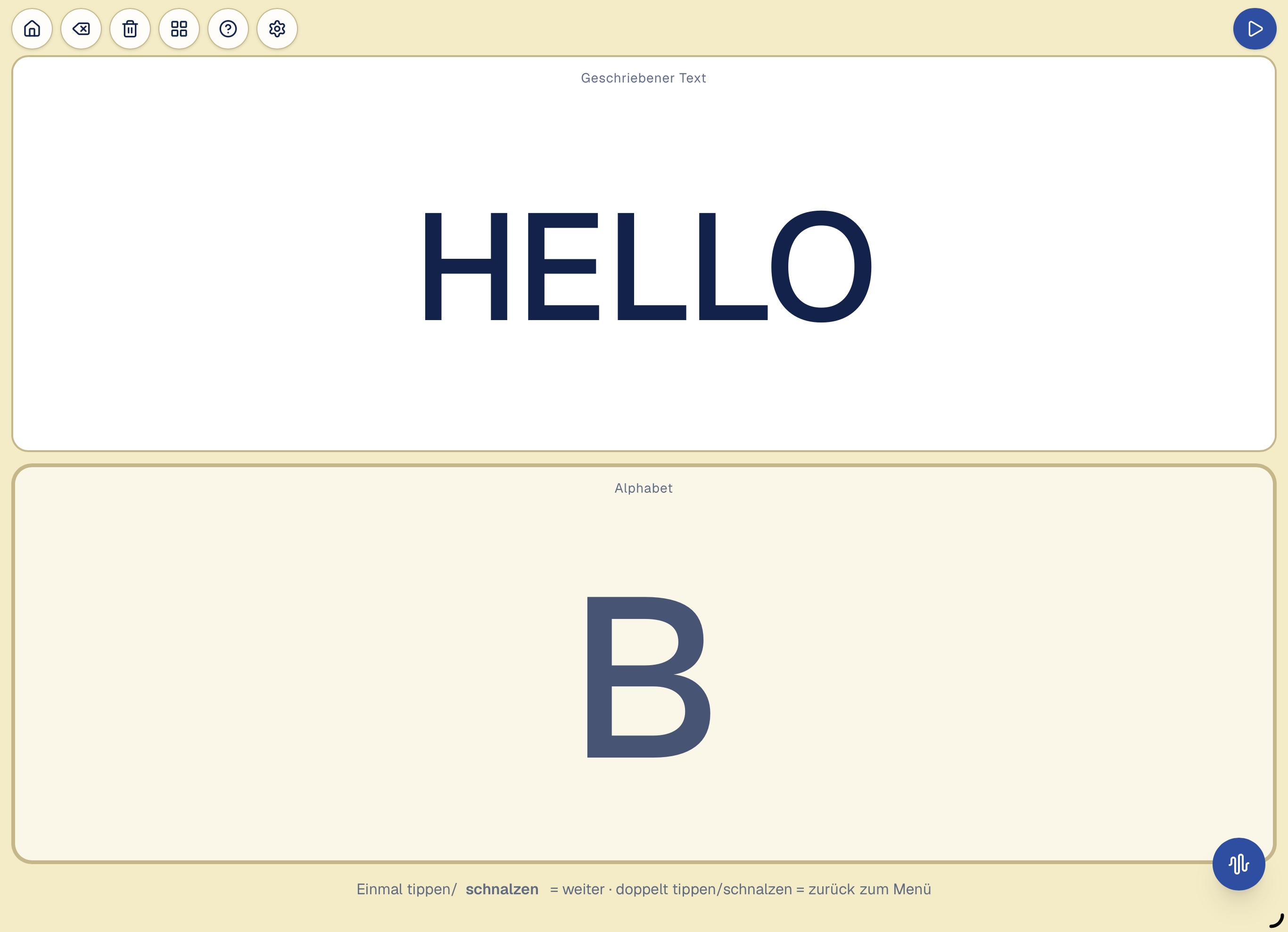
Main screen and function buttonsThe blue Start/Pause button is at the top right.
The four main menus
Alphabet
With the alphabet, you can build words and complete sentences letter by letter. Kalinio reads the letters aloud one after another and highlights them on the screen at the same time. When the letter you want is reached, activate once.
After the last letter, further choices follow:
Space · Delete · Clear all · Menu
The alphabet then starts again from the beginning.
Selecting “Space” makes the next letter begin a new word. “Delete” removes the last character entered, “Clear all” clears the entire text, and “Menu” returns to the main menu.
In this way, you can build individual words, several words or complete sentences step by step. The font size in the upper text field automatically adjusts to the length of the text.
Numbers
Select numbers in the same way as letters.
Words
Select frequently needed words and statements directly. Their entries can be changed in Settings.
I need help
Kalinio repeats “I need help” until the call is stopped. You do not need to spell out a sentence first.
In the Words menu, a selected word stays on the screen and is read aloud repeatedly until help arrives. If no one is around, a single click can pause the repeated reading without clearing the selection – another click resumes it. A double-click returns to the main menu.
A word takes shape: “HELLO” is already written at the top. Below, Kalinio shows the current letter “B”. During use, letters are read aloud one after another; one signal selects the desired letter.
Controls at the screen edge
The blue Start/Pause button is at the top right. Relatives or care staff can use it to start and stop automatic reading. Other small function buttons are at the top left, for example for the main menu, deleting and settings. They are deliberately small so that the user does not activate them accidentally.
Details about Start/Pause and protection against accidental clicks
Note about the blue Start/Pause button: If you pause reading with this button at the top right, it can only be restarted with the same button. Touch, mouse, switch, tongue click and camera gestures have no effect during this pause. This prevents reading from restarting accidentally.
When no touch-free click method is active, Kalinio protects the small function buttons at the top left of the main screen on iPhone and iPad from unintended mouse or trackpad clicks. Such a signal cannot suddenly open a menu or another function when the user intended to select a letter, number or word.
This also applies to external switches whose signal the device clearly identifies as a mouse or trackpad click. Other switches send keyboard or accessibility signals; Kalinio cannot reliably identify those as mouse or trackpad clicks.
Finger or stylus touch and accessibility controls that do not send mouse clicks remain unaffected.
Once a touch-free input method is active and usable, this protection is lifted and the function buttons can also be operated with a mouse or trackpad.
Troubleshooting
On the main screen, tap the function button with the question mark. Then choose what just happened—for example “Tongue click not recognized”, “Background noise triggered” or “Mouth opening or smile not recognized”. Kalinio then shows a suitable first check or setting to review.
Example: For “Tongue click not recognized”, the guidance takes you to tongue-click calibration and recommends checking capture, calibration and recognition accuracy. Troubleshooting changes nothing automatically; it only opens the relevant existing setting.
Input methods and double actionsOne signal, different possibilities
Touch, mouse or switch
Touch your iPad or iPhone screen, click a mouse or press an external switch.
Tongue click
A short tongue-click sound makes a selection. The microphone recognizes the sound you have taught Kalinio.
Open your mouth or smile
The front camera recognizes your calibrated mouth opening or smile and makes a selection.
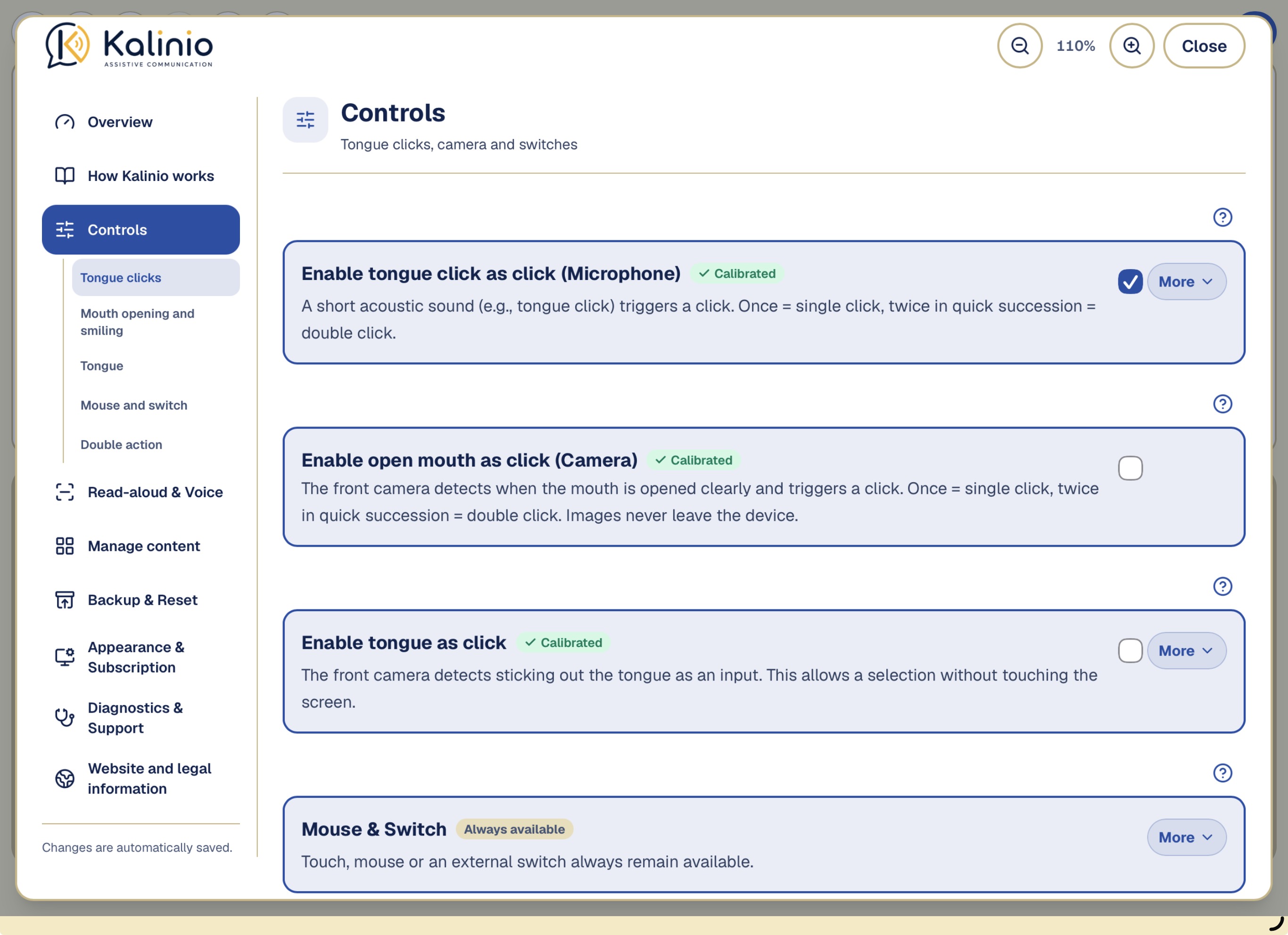
Enable tongue as click
The front camera detects sticking out the tongue as an input. This allows a selection without touching the screen.
Only one touch-free input method—tongue click, mouth opening/smile or tongue—can be enabled at a time. Touch, mouse and switches remain available alongside it.
Calibration means repeating your tongue click or gesture several times so Kalinio can learn your personal signal. Choose a movement you can repeat comfortably and reliably in everyday use.
The controls overview: Choose your input method here. Touch, mouse and switches remain available alongside it.
Activate once
Kalinio selects the letter, word or menu item that is currently being read and highlighted. If reading is paused, it continues.
Double action
Kalinio can recognize two inputs made shortly after one another as a separate action. Examples include two clicks, two tongue-click sounds or opening the mouth twice. This also applies to two clearly separated tongue movements.
During automatic reading, a double action pauses scanning. Activating twice again while paused returns Kalinio to the main menu.
For some users, deliberately activating twice is difficult. Slow, stepwise or involuntary movements may cause two signals to be recognized even though only one selection was intended.
In this case, the double-action feature can be turned off. Normal single selection remains fully available. Pause and return to the main menu are then operated, when needed, using the function buttons at the top of the screen.
Recommendation: Leave double action enabled if the user can deliberately and reliably activate twice. Turn it off if unintended double actions occur frequently.
Mouse & Switch
Operation by touch, meaning touching the screen on an iPad or iPhone, and by mouse or external switch is always available.
For double inputs, such as a double click or double tongue click, there is a Maximum Double-Click Interval (only for mouse or switch) / Double-click max interval (clicking sound) control. It sets the longest time allowed between the two inputs for Kalinio to recognize them as one double action. If more time passes, Kalinio treats them as separate inputs.
For mouse and switches there is also a Minimum Double-Click Interval (only for mouse or switch) control. It prevents two signals sent almost at the same time from being treated as a double click. Change these controls only if the user's double inputs are not recognized reliably.
In the app: Controls → Mouse & Switch
Snapping and microphoneA short tongue-click sound makes a selection.
Switch “Enable tongue click as click (Microphone)”
When Tongue click as click is enabled, the selected microphone listens for short tongue-click sounds. Tongue clicks must be calibrated before first use. The Capture threshold during calibration control determines which sounds the microphone records during calibration. The How closely must later clicks match the calibrated click? (This value can be changed at any time.) control then determines how closely a new tongue click must match the learned sounds.
Microphone profile
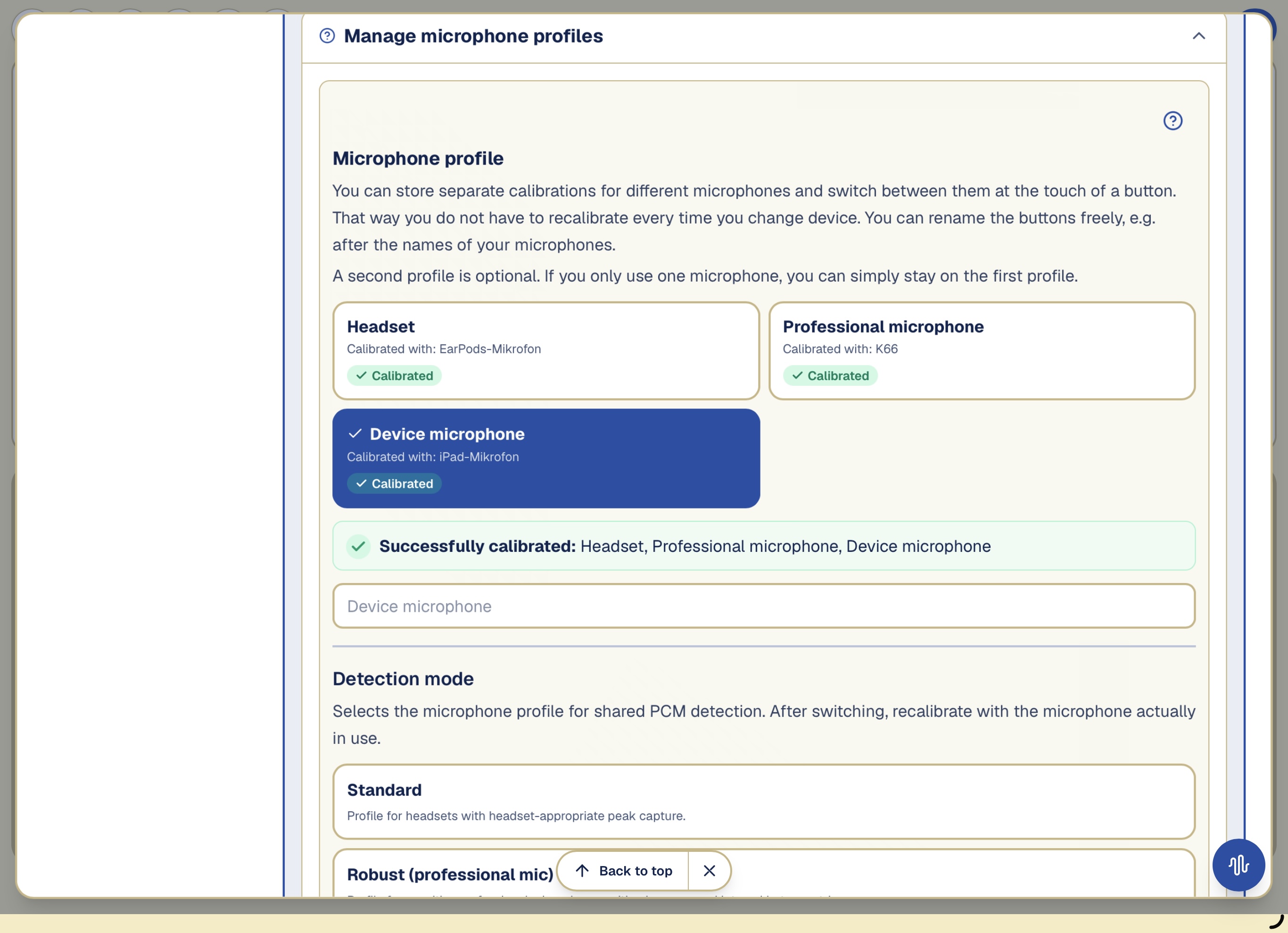
A tongue click sounds different through different microphones. Kalinio can store separate calibrations for each microphone. Calibrate each profile with its corresponding microphone. When returning to a microphone you have already set up, choose its saved profile. Calibrate again for a new microphone.
Headset
Standard
For a microphone worn close to the head, such as a headset.
Professional microphone
Robust (professional mic)
For sensitive professional microphones. This profile provides stronger protection against two accidental inputs in quick succession.
Device microphone
Device microphone
For the built-in microphone of an iPad, iPhone or laptop.
Microphone profiles store personal calibrations separately—for example for a headset and the built-in microphone.
Tongue-click calibration
Calibration means repeating your tongue click or gesture several times so Kalinio can learn your personal signal. Choose a movement you can repeat comfortably and reliably in everyday use.
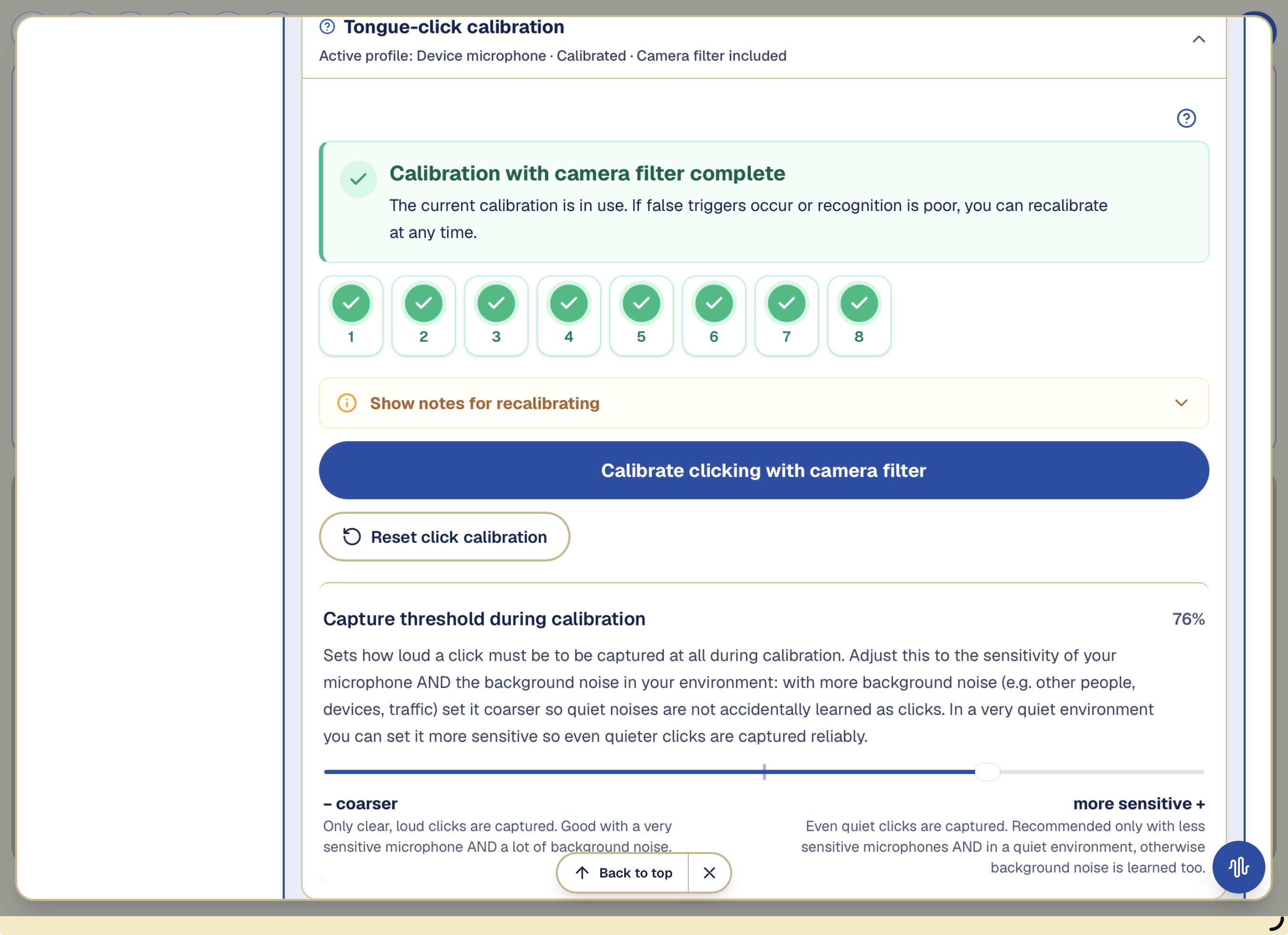
Please vary your clicks: sometimes loud, sometimes soft, sometimes higher, sometimes lower. Please make sure that no background noise accidentally earns a green check mark during recording. And: each click may earn only one green check mark, not accidentally two.
In the app: Controls → Tongue click & microphone → Calibrate clicking
During calibration, Kalinio learns several examples of your tongue click. Green check marks confirm the captured examples.
Switch “Camera filter for the click sound”
When the Camera filter for tongue clicks is enabled, a tongue click counts only if the camera sees a small mouth movement at the same time. This helps Kalinio ignore many background sounds without a matching mouth movement. Mouth movement alone does not make a click; use the separate “Open mouth as click” input method for that.
After activation, clicking must be recalibrated once so the camera knows your mouth movement while clicking.
Switch “Speech output while using the device microphone”
When Kalinio uses the built-in microphone for tongue-click detection, normal speech output is off by default. The device speaker is close to the microphone, so individual spoken sounds may be mistaken for a tongue click.
Mouth, smile and tongueThe front camera recognizes your calibrated mouth opening or smile and makes a selection.
Mouth & Camera
The front camera can recognize either mouth opening or smile as a touch-free input method. Choose the gesture the user can repeat clearly and reliably. Calibrate it in the user's usual sitting or lying position. The face and mouth must be fully visible, large enough in the camera image and well lit.
Switch “Enable open mouth as click (Camera)”
The front camera detects when the mouth is opened clearly and triggers a click. Once = single click, twice in quick succession = double click. Images never leave the device.
Switch “Enable smile as click (Camera)”
The front camera detects a clear smile and triggers a click. Once = single click, twice in quick succession = double click. Images never leave the device.
Calibrate mouth opening or smiling
Before Kalinio can reliably recognize a mouth opening or smile, the chosen gesture is calibrated once for the individual user.
This calibration is then used for two functions:
Selection: A mouth opening or smile can be used like a click.
Reading acceleration: If the user holds the calibrated gesture for longer, Kalinio can temporarily read through the choices faster. The gesture then only speeds up reading and does not make a selection.
Selection and reading acceleration have separate sensitivity sliders. For example, a clear mouth opening can be required for a click, while acceleration can begin with a slightly gentler movement or one held for longer.
Calibration tip: Open your mouth or smile as you intend to use the gesture later—clearly, but without unnecessary effort—and hold the movement for a brief moment. This helps Kalinio learn your personal target movement and distinguish it from ordinary mouth movements or facial expressions.
Switch “Enable tongue as click”
Tongue as click lets you make a selection by clearly sticking out the tongue. The front camera detects the movement directly on the device; camera images are processed locally for this purpose.
Stick out the tongue clearly, keep it visible for a brief moment, and then retract it fully. This triggers a selection.
For a double action, perform this movement twice in succession. The tongue must be fully retracted between the two movements. Both movements must occur within the configured time window. Keeping the tongue out continuously counts as only one input.
Make the movements as calm and clear as possible. First try the input in the body and camera position in which Kalinio will later be used.
In the app: Controls → Mouth & Camera → Switch “Enable tongue as click”
Reading, voice and accelerationFor long lists, you can temporarily speed up reading.
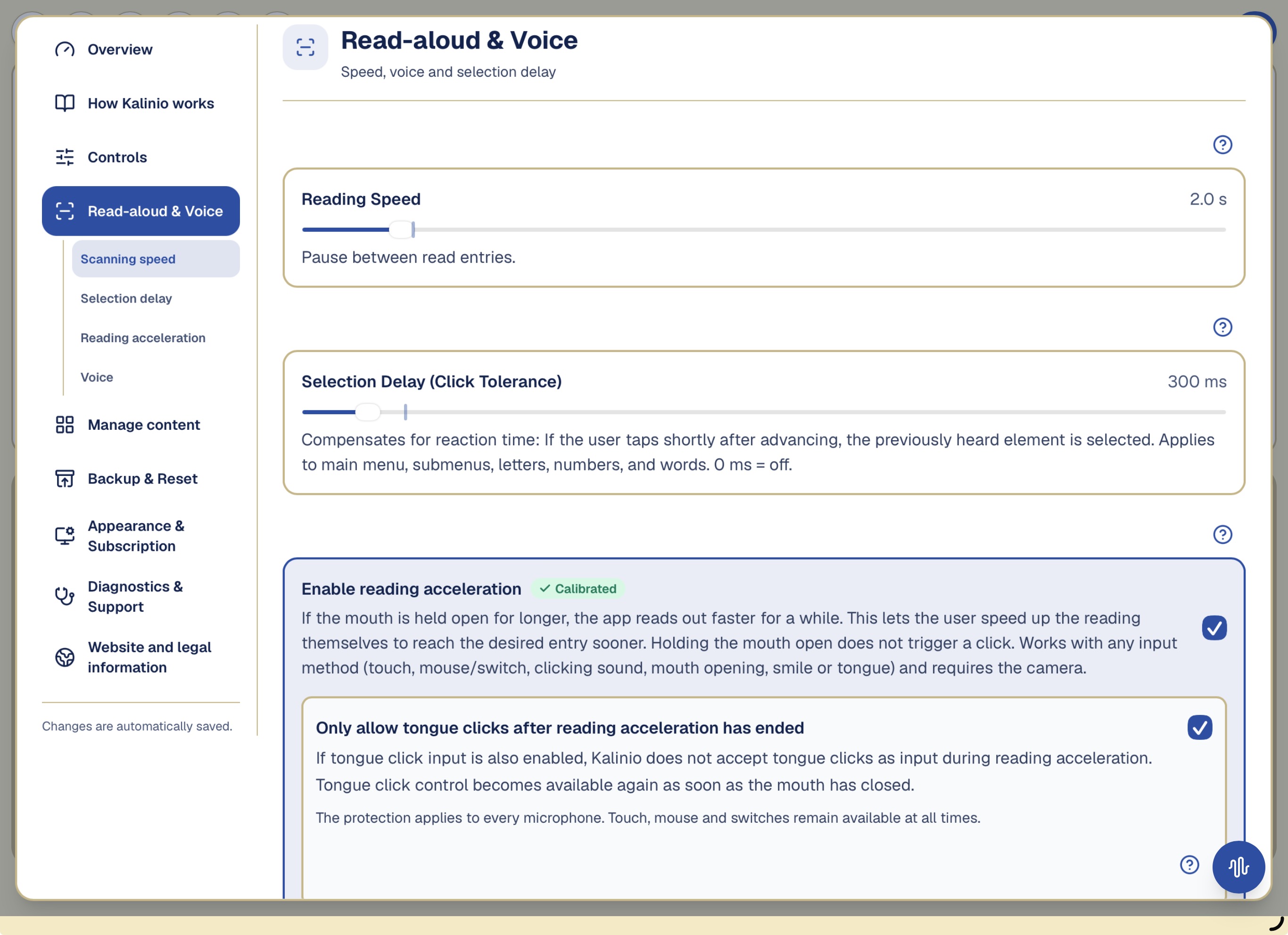
Control “Reading Speed”
This control sets how long Kalinio waits before reading and highlighting the next item.
Control “Selection Delay (Click Tolerance)”
This control compensates for a delayed reaction. If the user activates shortly after Kalinio moves on, the previously read item is still selected. At 0 ms this help is off.
Switch “Enable reading acceleration”
For long lists, you can temporarily speed up reading. Once the function is enabled and calibrated, hold your mouth open or hold a smile. Kalinio reads faster and returns to the normal pace when the gesture ends. The held gesture only speeds up reading—it does not select an item.
Explain the reading-acceleration controls
With Reading acceleration, the user can temporarily make Kalinio read faster by holding the mouth open or holding a smile. The gesture only speeds up reading and does not make a selection.
The Time until acceleration control sets how long the gesture must be held. The Reading acceleration sensitivity: How far must the mouth open? / Reading acceleration sensitivity: How clearly must the person smile? control sets how clearly the mouth must be opened or the smile shown. This feature needs the front camera, a suitable calibration and enough light.
Read-aloud and voice: Adjust the pause between items, selection delay and reading acceleration here.
Block tongue clicks during reading acceleration
When tongue-click input and reading acceleration are used together, you can enable additional protection against unintended selections. Kalinio then accepts no tongue clicks as input during reading acceleration. Sounds therefore cannot trigger a selection through tongue-click control during this phase.
As soon as the user closes their mouth or ends the smile, tongue-click control becomes available again automatically.
The protection only affects tongue-click input. Touch, mouse and switches remain available at all times.
Selection field “Speech output voice”
Chooses the voice used to read out letters, words and announcements. “Default (automatic)” lets the device decide. Only voices matching the selected language are shown. Tap “Test voice” to hear immediately how the selected voice sounds.
Note: which voices are available depends on the device. On iPhone/iPad you can add more natural-sounding voices under: Settings → Accessibility → Spoken Content → Voices. They then appear here for selection. Technical limitation on iPhone/iPad: the voice cannot always be changed reliably – the system sometimes keeps using the default voice even though another one is selected here. This is due to the operating system and unfortunately cannot be fully fixed in the app. Use “Test voice” to hear what actually takes effect.
Every control explainedEach control changes one setting.
Each control changes one setting. Change only one control at a time, then test several single and double inputs. Percentages are app settings, not medical measurements.
The accuracy control: Towards “strict”, sounds are compared more strictly; towards “loose”, greater differences from the learned tongue click are allowed.
Control “Capture threshold during calibration”
This control sets how loud a tongue click must be for Kalinio to record it during calibration. In a noisy environment, make the control less sensitive so that conversations, equipment or traffic are not stored as tongue clicks. In a quiet environment, it can be more sensitive so that quiet tongue clicks are also captured.
When should you change it?: When real snaps are not counted during calibration or noise receives check marks.
Show starting value, effects and possible consequences
Recommended setting
50 %
Set the control lower
Only clear, loud clicks are captured. Good with a very sensitive microphone AND a lot of background noise.
Set the control higher
Even quiet clicks are captured. Recommended only with less sensitive microphones AND in a quiet environment, otherwise background noise is learned too.
What can happen with a poor setting?
Too sensitive learns noise; too coarse rejects quiet real snaps. Recalibrate after a change.
Control “How closely must later clicks match the calibrated click? (This value can be changed at any time.)”
This control determines how closely a new tongue click must match the examples learned during calibration.
When should you change it?: When calibrated snaps are missed or similar environmental sounds trigger.
Show starting value, effects and possible consequences
Recommended setting
58 %
Set the control lower
A later tongue click must closely match the personally calibrated clicks. Fewer false triggers.
Set the control higher
Allows greater variation from the personally learned clicks. At the far right, personal matching is intentionally very generous.
What can happen with a poor setting?
Too generous increases false triggers; too strict rejects intended but varying snaps.
Control “Double-click max interval (clicking sound)”
This control applies only to tongue-click input. It sets the longest time allowed between two tongue clicks for Kalinio to recognize them as a double tongue click. A higher value gives the user more time for the second tongue click.
When should you change it?: When an intended double action becomes single, or two separate activations are paired.
Show starting value, effects and possible consequences
Recommended setting
1000 ms
Set the control lower
Less time between the two impulses.
Set the control higher
More time between the two impulses.
What can happen with a poor setting?
Too low misses slow doubles; too high joins separate inputs.
Background: Why two tongue clicks must not follow one another too quickly
A single tongue click produces more than a very short sound: it can briefly ring out or contain small follow-up signals. Without protection, Kalinio could mistake these parts for a second tongue click and incorrectly turn them into a double action.
That is why there is a very short technical protection interval after each recognized tongue click. Kalinio ignores further tongue-click impulses during this interval. Its length depends on the microphone profile.
This helps avoid false double tongue clicks, but has a small drawback: if the second tongue click is made extremely quickly, it may fall within this protection interval and therefore not be recognized.
In practice: Make the two tongue clicks promptly, but leave a small audible gap between them. At the same time, they must not be so far apart that the configured maximum interval is exceeded.
Control “Maximum Double-Click Interval (only for mouse or switch)”
This control sets the longest time allowed between two mouse clicks or switch activations for Kalinio to recognize them as a double click. A higher value gives the user more time for the second input.
When should you change it?: When an intended double action becomes single, or two separate activations are paired.
Show starting value, effects and possible consequences
Recommended setting
800 ms
Set the control lower
Less time between the two impulses.
Set the control higher
More time between the two impulses.
What can happen with a poor setting?
Too low misses slow doubles; too high joins separate inputs.
Control “Minimum Double-Click Interval (only for mouse or switch)”
This control protects against two signals that arrive almost at the same time. They can occur when an external switch bounces electrically or a small involuntary movement produces two clicks. Kalinio then treats them as one click. At 0 ms this protection is off.
When should you change it?: When switch bounce or small movements trigger double actions.
Show starting value, effects and possible consequences
Recommended setting
60 ms
Set the control lower
Very fast successive impulses count more readily as a double click; 0 ms disables protection.
Set the control higher
More very fast impulses are discarded as bounce.
What can happen with a poor setting?
Too low gives little protection; too high may discard a deliberate fast double click.
Control “Selection sensitivity: How far must the mouth open to trigger a selection?”
The front camera detects when the mouth is opened clearly and triggers a click. Once = single click, twice in quick succession = double click. Images never leave the device.
When should you change it?: Check the lighting and camera angle. Calibrate mouth opening or smile again and, if needed, adjust the Selection sensitivity: How far must the mouth open to trigger a selection? / Selection sensitivity: How distinct must the smile be to trigger a selection? control.
Show starting value, effects and possible consequences
Recommended setting
60 %
Set the control lower
Only a clearly wide-open mouth triggers a selection. Fewer false triggers, but the mouth must open clearly.
Set the control higher
Even a small mouth opening triggers a selection. Works more easily, but can select accidentally more often — e.g. while speaking.
What can happen with a poor setting?
If the control is too sensitive, normal mouth movements or facial expressions may trigger an action accidentally. If it is not sensitive enough, the user may need to make the gesture more strongly than is comfortable or possible.
Control “Selection sensitivity: How distinct must the smile be to trigger a selection?”
The front camera detects a clear smile and triggers a click. Once = single click, twice in quick succession = double click. Images never leave the device.
When should you change it?: Check lighting, camera angle, sensitivity, and the personal smile calibration.
Show starting value, effects and possible consequences
Recommended setting
60 %
Set the control lower
Only a clear smile triggers a selection. Fewer false triggers, but the smile must be pronounced.
Set the control higher
Even a slight smile triggers a selection. Works more easily, but other facial expressions may select accidentally.
What can happen with a poor setting?
If the control is too sensitive, normal mouth movements or facial expressions may trigger an action accidentally. If it is not sensitive enough, the user may need to make the gesture more strongly than is comfortable or possible.
Control “Reading acceleration sensitivity: How far must the mouth open?”
This control sets how far the user must open their mouth before Kalinio reads faster.
When should you change it?: Check the lighting, camera angle and calibration. Then adjust the Time until acceleration and Reading acceleration sensitivity: How far must the mouth open? / Reading acceleration sensitivity: How clearly must the person smile? controls.
Show starting value, effects and possible consequences
Recommended setting
60 %
Set the control lower
Reading acceleration starts only with a clearly wide-open mouth. Fewer unintended accelerations, but the mouth must remain clearly open.
Set the control higher
Even a small mouth opening can speed up reading. Works more easily, but small mouth movements may accelerate it unintentionally.
What can happen with a poor setting?
If the control is too sensitive, normal mouth movements or facial expressions may trigger an action accidentally. If it is not sensitive enough, the user may need to make the gesture more strongly than is comfortable or possible.
Control “Reading acceleration sensitivity: How clearly must the person smile?”
This control sets how clearly the user must smile before Kalinio reads faster.
When should you change it?: Make sure the face is well lit, and check the camera, personal smile calibration, and the separate acceleration sensitivity.
Show starting value, effects and possible consequences
Recommended setting
60 %
Set the control lower
Reading acceleration starts only with a clear smile. Fewer unintended accelerations, but the smile must be held clearly.
Set the control higher
Even a slight smile can speed up reading. Works more easily, but other facial expressions may accelerate it unintentionally.
What can happen with a poor setting?
If the control is too sensitive, normal mouth movements or facial expressions may trigger an action accidentally. If it is not sensitive enough, the user may need to make the gesture more strongly than is comfortable or possible.
Control “Double mouth-open max interval”
This control applies only to mouth-opening input. It sets the longest time allowed between two mouth openings for Kalinio to recognize them as a double action. A higher value gives the user more time for the second mouth opening.
When should you change it?: When an intended double action becomes single, or two separate activations are paired.
Show starting value, effects and possible consequences
Recommended setting
1800 ms
Set the control lower
Less time between the two impulses.
Set the control higher
More time between the two impulses.
What can happen with a poor setting?
Too low misses slow doubles; too high joins separate inputs.
Control “Maximum interval for smiling twice”
This control applies only to smile input. It sets the longest time allowed between two smiles for Kalinio to recognize them as a double action. A higher value gives the user more time for the second gesture.
When should you change it?: When an intended double action becomes single, or two separate activations are paired.
Show starting value, effects and possible consequences
Recommended setting
1800 ms
Set the control lower
Less time between the two impulses.
Set the control higher
More time between the two impulses.
What can happen with a poor setting?
Too low misses slow doubles; too high joins separate inputs.
Control “Maximum interval between two tongue movements”
Set how much time may pass between two separate tongue movements for Kalinio to still recognize them as a double action.
When should you change it?: When an intended double action becomes single, or two separate activations are paired.
Show starting value, effects and possible consequences
Recommended setting
1800 ms
Set the control lower
Very fast movements that are visible only briefly may be too short for reliable recognition.
Set the control higher
Stick out the tongue clearly for each movement and retract it fully in between. If you need more time for two successive movements, increase the maximum interval accordingly.
What can happen with a poor setting?
Too low misses slow doubles; too high joins separate inputs.
Control “Reading Speed”
This control sets how long Kalinio waits before reading and highlighting the next item.
When should you change it?: When the person often misses the next item or waits unnecessarily long.
Show starting value, effects and possible consequences
Recommended setting
1,6 s
Set the control lower
Items advance faster.
Set the control higher
Items remain audible and visible longer.
What can happen with a poor setting?
Too short impairs understanding and activation; too long slows communication.
Control “Time until acceleration”
This control sets how long the user must hold their mouth open or keep smiling before Kalinio reads faster.
When should you change it?: When acceleration starts too early or too late despite deliberate holding.
Show starting value, effects and possible consequences
Recommended setting
2,00 s
Set the control lower
Acceleration starts sooner during the held gesture.
Set the control higher
The gesture must be held longer.
What can happen with a poor setting?
Too short can accelerate unintentionally; too long can be tiring or impractical.
Control “Selection Delay (Click Tolerance)”
This control compensates for a delayed reaction. If the user activates shortly after Kalinio moves on, the previously read item is still selected. At 0 ms this help is off.
When should you change it?: When reaction time regularly selects one item too late.
Show starting value, effects and possible consequences
Recommended setting
300 ms
Set the control lower
Less retrospective click tolerance; 0 ms turns it off.
Set the control higher
More time in which the previously heard item can still be selected.
What can happen with a poor setting?
Too low does not compensate for reaction time; too high may select a previous item no longer intended.
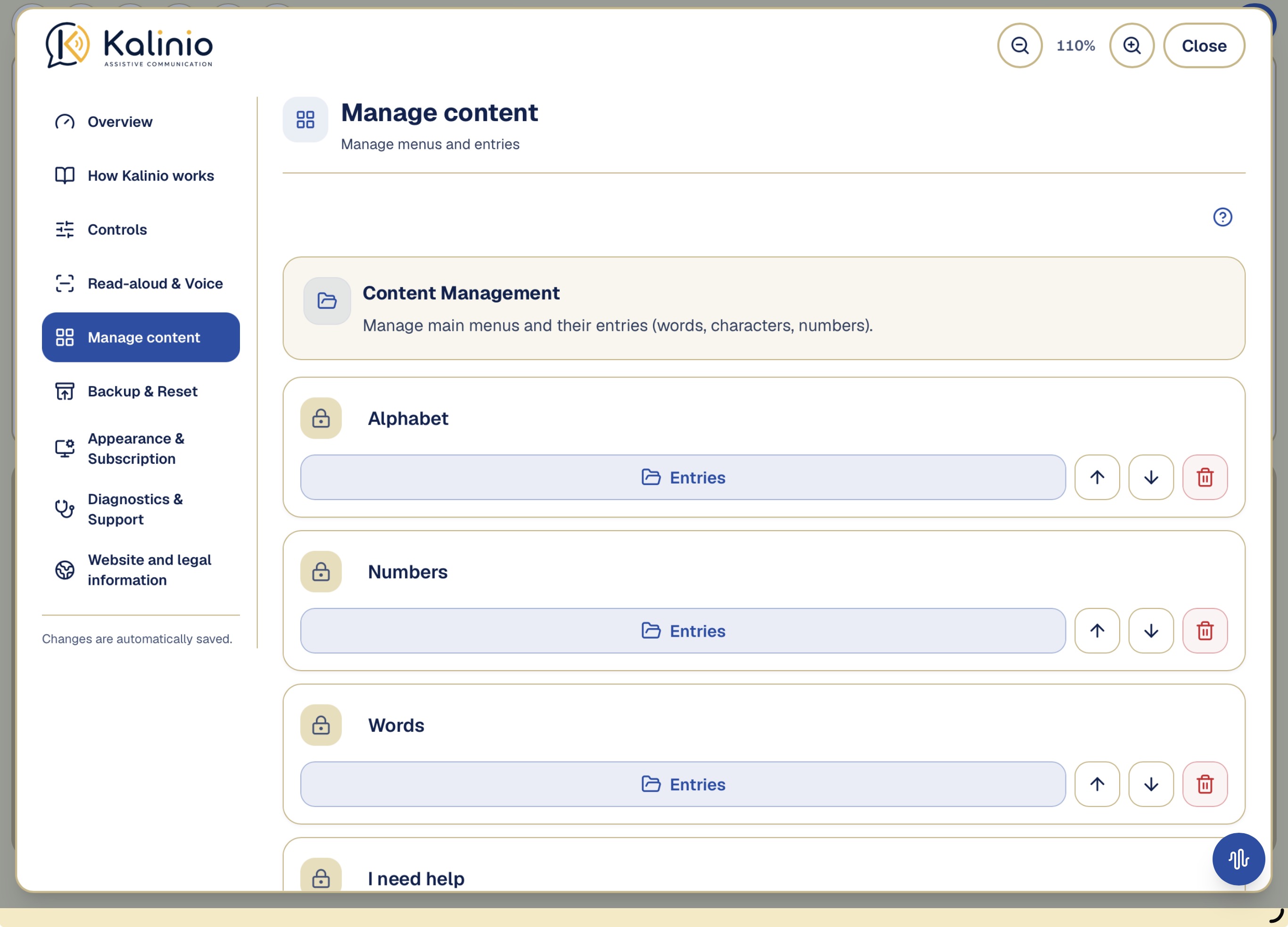
Manage contentUnder Manage content, you can create, rename, sort or delete menus and entries.
Under Manage content, you can create, rename, sort or delete menus and entries. Backup, restore, and the separate reset functions are available in the dedicated Backup & Reset section.
Important note: The four standard menus (Alphabet, Numbers, Words, I need help), the commands (Space, Delete, Clear all, Menu) and the reading voice automatically follow the selected language – so they are displayed and read aloud in that language. The preset letters, numbers and words also adapt to the language when you restore the default values in the settings: the bundled example words (e.g. “Call the nurse”) then appear automatically in the selected language. Only words you add or change yourself and menus you create yourself are displayed and read aloud exactly as you enter them. Please translate these manually into the user's language – via Settings → Manage content. There you can rename every word, add new ones and remove those you don't need. The symbols remain as orientation.
In the app: Manage content
Manage content: Open a menu's entries to adjust frequently needed words, for example.
Quick Analysis and supportWhen you enable Quick Analysis on the main screen, an extra button appears at the bottom right.
Quick analysis on the main screen
When you enable Quick Analysis on the main screen, an extra button appears at the bottom right. Tap it directly after a recognition error. Kalinio then keeps the previous six seconds for review. For tongue clicks you can review the sound; for mouth opening, smile or tongue, only the recorded mouth area is shown. Kalinio then suggests possible causes. The feature is normally off.
Please share only the text report with support. Original audio or camera recordings contain personal data and are intended solely for your own analysis.
Only the normalized mouth area is shown. The full face was not recorded.
Show further diagnostic and support functions
20-second recognition diagnostics
Long technical view for snapping and mouth opening. Use it mainly when requested by support.
Recognition diagnostics works with a rolling 15-second window. Only the measurements from the last 15 seconds are ever evaluated; older data is deleted automatically.
Diagnostics & Support
Overview of the app's technical state. Helpful for finding the cause of problems or giving support targeted information.
The diagnostic report contains only technical information (app version, device model, operating system, error logs and settings). Personal text entries or communication content are not transmitted.
In the app: Diagnostics & Support
Backup and resetKalinio automatically stores your communication content and settings on this device.
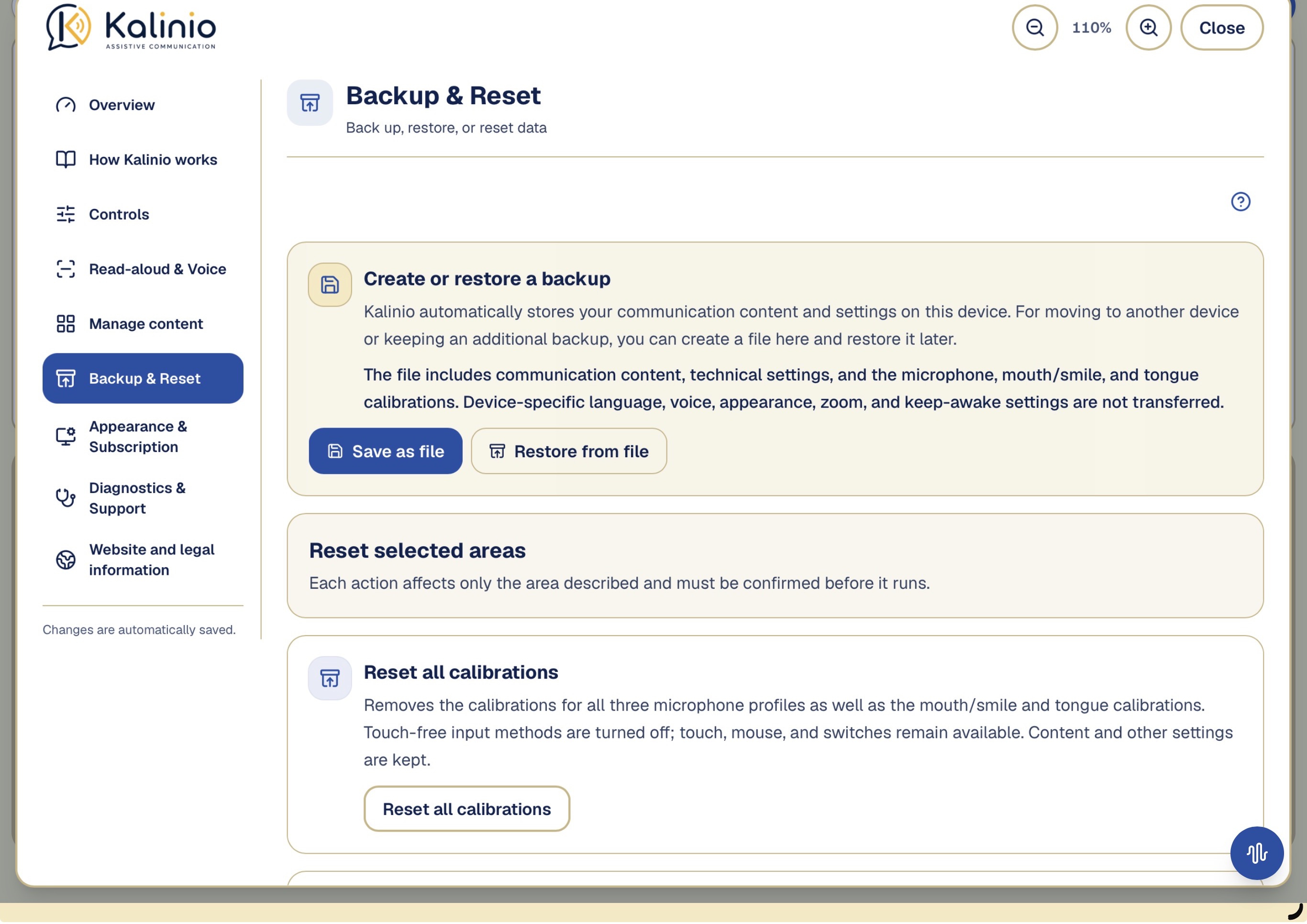
Create or restore a backup
Kalinio automatically stores your communication content and settings on this device. For moving to another device or keeping an additional backup, you can create a file here and restore it later.
The file includes communication content, technical settings, and the microphone, mouth/smile, and tongue calibrations. Device-specific language, voice, appearance, zoom, and keep-awake settings are not transferred.
Save as fileRestore from file
Create or restore a backup file. The reset sections are separate from this.
Reset selected areas
Reset all calibrations
Removes the calibrations for all three microphone profiles as well as the mouth/smile and tongue calibrations. Touch-free input methods are turned off; touch, mouse, and switches remain available. Content and other settings are kept.
Reset communication content
Restores the main menus, words, characters, numbers, and their order to the original state. Self-created menus and entries are deleted. Settings and calibrations are kept.
Restore recommended settings
Restores controls such as reading speed, selection delay, double action, and camera sensitivity to their recommended values. Communication content and personal calibrations are kept.
Reset Kalinio completely
Display, privacy and subscriptionMicrophone, camera and recognition data are processed locally for live operation.
Selection field “Color scheme”
Sets whether the app is shown light or dark. “System” automatically follows your device setting.
System · Light · Dark
Switch “Keep screen on”
Prevents the screen from dimming automatically after the time set on the device, while the app is open. Recommended so the display does not turn off while listening and waiting.
Privacy during analysis and recognition
Microphone, camera and recognition data are processed locally for live operation. Diagnostic recordings are created only after deliberate activation; export or sharing occurs only after your explicit action.
Important privacy note: Ongoing face, tongue and snap recognition is processed locally on your device. Time-limited diagnostic recordings are retained locally only when you deliberately start the corresponding recording. Nothing is transmitted automatically. A report, original audio or camera data set leaves the device only when you explicitly choose the share/export function.
Subscription
Unlimited access to all communication features
Under “Subscription” in Settings, you can view its current status and manage it through Apple. New users can try Kalinio free for 14 days if they are eligible for the trial offer. After that, continued access to Kalinio requires a paid monthly or annual subscription. The app cannot be used without an active subscription. The subscription renews automatically unless it is canceled in Apple’s subscription settings.
Manage subscription
Legal information
Legal notice, privacy policy and terms of use for this app
The Apple Standard End User License Agreement (EULA) applies to your use of the Kalinio app.
Solve common problemsStart with power, permissions, distance, lighting, the active input method and the status display.
Start with power, permissions, distance, lighting, the active input method and the status display. Then change only the named setting.
Tongue click was not recognized
Check first
Check that the correct microphone profile is selected and that the microphone hears the tongue click clearly. Then calibrate again and check the Capture threshold during calibration and How closely must later clicks match the calibrated click? (This value can be changed at any time.) controls. The sound is not audible. Check the volume, microphone distance and active microphone profile.
Then in Settings
In the app: Controls → Tongue click & microphone
Tip: during calibration, deliberately vary your clicks – sometimes loud, sometimes soft, sometimes higher, sometimes lower. This lets the app learn the full range of your clicking and recognise it more reliably later, even when excitement makes it louder or quieter.
A background noise triggered an action
Check first
Move the How closely must later clicks match the calibrated click? (This value can be changed at any time.) control toward strict. Also check the microphone profile and whether background sounds were accidentally stored during calibration.
Then in Settings
In the app: Detection mode → Tongue-click calibration
When calibrated snaps are missed or similar environmental sounds trigger.
A single input was mistaken for a double / A double input was mistaken for a single
Check first
If one input is incorrectly treated as a double action, reduce the relevant Maximum interval control. For mouse or switch, a larger Minimum interval may also help. If two intended inputs are recognized only as separate inputs, increase the relevant Maximum interval control. This gives the user more time for the second input.
Then in Settings
In the app: Shared input behavior
When an intended double action becomes single, or two separate activations are paired.
Mouth opening or smile was not recognized
Check first
Check the lighting and camera angle. Calibrate mouth opening or smile again and, if needed, adjust the Selection sensitivity: How far must the mouth open to trigger a selection? / Selection sensitivity: How distinct must the smile be to trigger a selection? control.
Then in Settings
In the app: Controls → Mouth & Camera
The front camera can recognize either **mouth opening** or **smile** as a touch-free input method. Choose the gesture the user can repeat clearly and reliably. Calibrate it in the user's usual sitting or lying position. The face and mouth must be fully visible, large enough in the camera image and well lit.
Calibration does not count
Check first
Ensure a quiet room or good light, check distance and a clear view, and repeat the gesture clearly with short pauses. During snap calibration only the intended sound should receive a check mark.
Then in Settings
In the app: Tongue-click calibration / Calibrate mouth opening / Calibrate smile
{n} not counted – please hold your mouth open a little longer
Face briefly lost – please repeat the mouth opening.
Check first
The camera repeatedly lost the face for a moment. Even when aligned correctly, the face can appear too small at this distance. Please move the iPad a little closer and repeat the mouth opening.
Then in Settings
In the app: Mouth & Camera
Place the device securely and, if possible, at face height. The user can keep their natural head position. Aim the camera so that the face and mouth are fully visible, large enough and well lit.
Reading acceleration does not work
Check first
Check the lighting, camera angle and calibration. Then adjust the Time until acceleration and Reading acceleration sensitivity: How far must the mouth open? / Reading acceleration sensitivity: How clearly must the person smile? controls.
Then in Settings
In the app: Read-aloud & Voice → Switch “Enable reading acceleration”
With **Reading acceleration**, the user can temporarily make Kalinio read faster by holding the mouth open or holding a smile. The gesture only speeds up reading and does not make a selection.
The **Time until acceleration** control sets how long the gesture must be held. The **Reading acceleration sensitivity: How far must the mouth open? / Reading acceleration sensitivity: How clearly must the person smile?** control sets how clearly the mouth must be opened or the smile shown. This feature needs the front camera, a suitable calibration and enough light.
Noise during reading acceleration
Check first
Check that the held mouth or smile gesture has ended. Keep “Allow snaps only after reading acceleration has ended” enabled and capture the case with Quick Analysis if needed.
Then in Settings
In the app: Read-aloud & Voice → Switch “Only allow tongue clicks after reading acceleration has ended”
The protection applies to every microphone. Touch, mouse and switches remain available at all times.
Wrong input method active
Check first
Under Control, check which touch-free method is active. Snapping, mouth/smile and tongue are alternatives; touch, mouse and switches remain available.
Then in Settings
In the app: Controls
Device microphone and speaker interfere
Check first
With Device microphone, initially leave normal speech output off. If needed, enable it deliberately and then test for unintended activations.
Then in Settings
In the app: Tongue click & microphone → Device microphone
The device speaker is close to the built-in microphone. Kalinio may therefore mistake its own announcement for a tongue click, while a user farther away may be heard only quietly. This can cause unintended selections. Enable speech output only when needed, then test tongue-click recognition carefully.
Voice cannot be heard
Check first
Check system volume, mute and the audio route. Use “Test voice” under Reading & Voice; a connected microphone may route output to headphones or an external output.
Then in Settings
In the app: Read-aloud & Voice → Selection field “Speech output voice” → Test voice
Note: which voices are available depends on the device. On iPhone/iPad you can add more natural-sounding voices under: Settings → Accessibility → Spoken Content → Voices. They then appear here for selection. Technical limitation on iPhone/iPad: the voice cannot always be changed reliably – the system sometimes keeps using the default voice even though another one is selected here. This is due to the operating system and unfortunately cannot be fully fixed in the app. Use “Test voice” to hear what actually takes effect.
Reset calibrations or settings
Check first
Create a backup file before a larger reset. Then reset calibrations, communication content or recommended settings separately; factory state removes all local content and settings.